 CRM
The call desk
What you will learn
- The call desk and your status
- Taking a call from the call bar
- Callbacks: claim, call, record the outcome
- Calling a contact from a conversation
What you need
- A customer operations sign-in, a microphone, and permission for the browser to use it
Support → Calls.
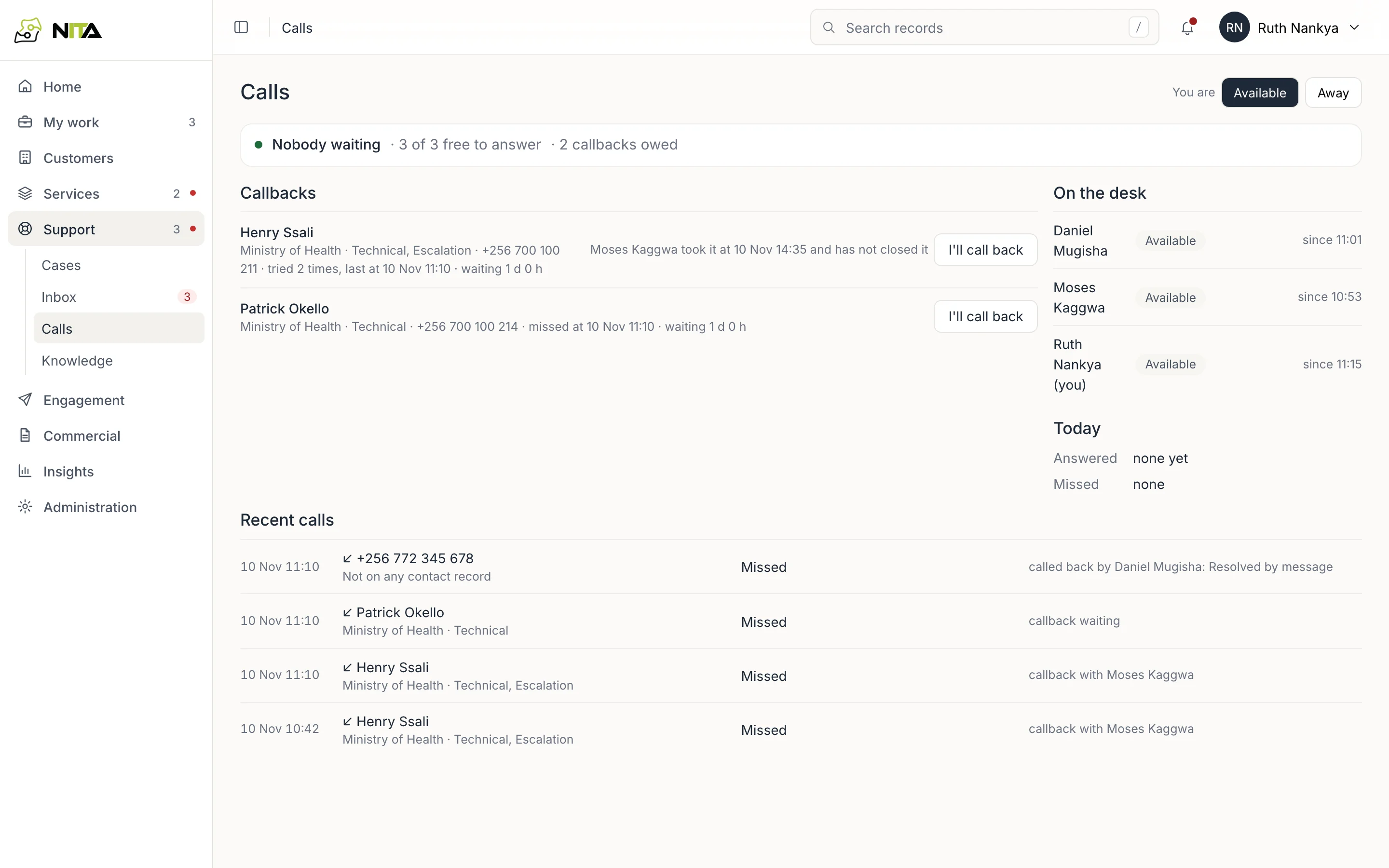
- You are: Available or Away. Only available people are rung. Your choice is kept in this browser.
- Status line: calls waiting, people free to answer, callbacks owed.
- Callbacks: one line per caller with unanswered calls, oldest first.
- On the desk: people signed in to calls, their status and since when.
- Today: answered and missed calls since midnight, Kampala time.
- Recent calls: direction, caller, result and what happened next. Calls from earlier days show their date.
Calls are open to customer operations, the NOC, account managers, management and administrators.
Taking a call
An incoming WhatsApp call rings everyone available, on any page. The call bar shows the caller matched to a contact by phone number, with their customer and roles, or Not on any contact record.
- Answer connects the call through the browser's microphone. The first person to answer takes it; it stops ringing for the others.
- During the call: Mute / Unmute, Hang up, Open customer and Log a case (case registration with the caller filled in).
- Decline leaves the call to others. If nobody answers, it becomes a missed call.
Your status is on a call while connected, and new calls do not ring you.
Callbacks
Every missed call creates a callback for that caller. Several missed calls from one number are one callback, showing the number of tries and the last time.
- I'll call back claims the callback. It shows on the desk as yours.
- Call now places a WhatsApp call to the number.
- Record outcome: Reached, No answer, Wrong number or Resolved by message, with an optional note. The callback closes.
- Give back releases it to the desk.
A callback claimed and not closed shows who took it and when, and anyone can claim it again.
WhatsApp only connects a business call to a person who has agreed to receive calls. If a call cannot be placed, Ask to call in the conversation sends the request on WhatsApp.
Calling from a conversation
In Support → Inbox, Call on WhatsApp in a WhatsApp conversation places the call to that number. The call appears in Recent calls, and the conversation stays linked to the contact. See Inbox.